
| CB102988 | Reconditioned Atari NTSC Falcon 030 Computer with 32 - 80 Meg Hard Drive, 1- 4 Meg Ram, HD Disk Drive, English Owners Manual, 110V Power Cord and STM1 Mouse Sold Out |
NEW Item!
Best Electronics Compact Flash Upgrade Kit for the Atari Falcon 030 Computer.
Best has been hearing from some Falcons hackers for some time now, who have adapted Compact Flash (CF) storage cards with a modified adapter card for use with the Atari Falcon to replace the Internal IDE Falcon Hard Drives.
Why use Compact Flash storage technology on the Atari Falcon?
Now with Compact Flash storage cards technology is maturing and are now being mass-produced, CF storage cards prices have dropped in recent years.
Solid State (no moving parts) fast electronic storage of your Falcon data Vs a Mechanical spinning Internal Hard Drive mech, which as we all know, all Hard Drive Mechs will wear out (with so many hours of use) or just outright fail on you. Have you ever heard of a Compact Flash Storage card failing?
With a Falcon compact Flash upgrade kit installed inside your Falcon 030, you will find your Falcon making one less Internal Hard Drive noise. Now you will only hear the occasional internal Floppy sounds and the internal Falcon cooling fan only!
The Best Falcon CF upgrade board mounts to the existing Atari Falcon Internal Hard Drive bracket, no other new hardware required.
Generally in most cases (depends on the Atari Falcon formatting software and Compact Flash card) you will find faster file access speeds and shorter file read and write cycles. Best Installs either the 1993 Atari Falcon HDX Hard Drive boot up program or the State of the Art very Fast HDDriver Falcon Boot up program on each Compact Flash memory card included with each Falcon Compact Flash upgrade Kit.
Extends the life of the Falcon Internal Power supply. A CF Card Draws a lot less power / amps off the Falcon Internal Power supply compared to a older Power Hungry spinning IDE hard drive mechs.
Sam C. of TX. By Sam's low Best Customer number, we can tell he has been a Best Electronics Atari customer for over 20+ years now. He recently placed back to back Atari orders. On his second Atari order, Sam ordered the Best Falcon Compact Flash 2 GB upgrade for his Atari Falcon. Placing his third Atari order in a row with Best he said: "The Best Electronic Compact Flash upgrade is phenomenal. I regret waiting so long before acquiring one. It was an effortless installation thanks in part to the included printed, very detailed instructions and accompanying photos. Those are what made it “fool-proof” for me. Great job! Bravo!!!"
Dimitrios B. of Greece "I receive yesterday my Falcon 2 GB Falcon Compact Flash Upgrade Kit
and im very happy !!! Thank you!!!!"
Follow up Comment "Im very happy with my 2 GB Falcon Compact Flash Upgrade Kit!!! Excellent quality and the best documentation ever seen!!!! Thank you!"Edward B. of IN By Edwards low Best Customer number, we can tell he has been a Best Atari customer for over 20+ years now. Edward ordered one of Bests Falcon Compact Flash (Solid state replacement for the Falcon internal 2 1/2 inch mechanical Hard Drive mech.) upgrades kits. "Just wanted to say that installed my CF upgrade for my Falcon. It is wonderful and works like a charm. I cannot believe the speed in the boot process. Now all I have to do is setup the boot partition. Thanks much for this and thanks much for the very fast service. I did not expect the upgrade to arrive in just two days time. You guys are awesome. Thanks again"
A Compact Flash Falcon storage Upgrade draws less current (less strain on the internal Falcon Power supply) Vs an internal Hard drive mech. Compact Flash cards do not generate as much internal heat compared to an always spinning / running Internal IDE Falcon Hard Drive mech.
Best Electronics Falcon Compact Flash Upgrade Kit has been Tested and Engineered to be easy to install and once installed, maintenance free. In most cases if you can change a tire or battery on a car and have a Phillips screwdriver, you can install a Falcon Compact Flash upgrade Kit inside your Falcon 030 Computer. A solder less, plug in upgrade.
The Best Electronics Falcon 030 Compact Flash Upgrade Kit comes with a 2 GB Compact Flashcard (2 large Falcon partitions installed and we can custom set up any more numbers of Falcon smaller partitions you request at time of purchase), Compared to the stock original Atari Falcon 030 80 MB Internal IDE Hard Drive, the 2 GB Compact Flash card is a 25X increase in storage capacity for your Atari Falcon. The Average Atari Falcon user will probably never use all of this new storage capacity up! Larger CF Cards like a 4 GB version will have 4 partitions or more installed. The default Max Falcon Hard Drive / Compact Flash partition size is 1 GB or less.
With Compact Flash Cards getting larger in GB size and prices dropping, all you have to do to upgrade your Best Electronics 2 GB Compact Flash Falcon in the future is unplug the 2 GB Compact Flash card and Atari Falcon format the new larger Compact Flash Card slide in card.
The Best CF Falcon adapter board will accept Type 1 and Type 2 CF memory cards and also the SDHC, miniSD, microSD, and RSMMC with a CF type 2 adapter / conversion card (CF card size adapter card with slots for the other version / standards of micro memory storage cards above).
Best Electronics has done all of the prep work on the setting up the CF memory card for use with the Atari Falcon 030 computer. It can take an average of 1 to 3 ˝+ hours alone to Falcon Format and Sector scan a new CF memory card depending on the size of the CF card. So when you get your Best Electronics CF Falcon drive, it has been Falcon formatted and is Lock and Load ready to drop into your Falcon and boot up from day one.
Stian E. of Norway "I can really see overall performance improvement after installing both the CF and RTC chip." Best's Atari Falcon 2 GB Compact Flash adapter and new replacement Falcon Clock module
Recently Best was informed by the programmer of the HDDriver Atari Hard Drive prep program we could no longer install the HDDriver fast boot up file only (similar to the Atari 8 bit DOS boot up file) on any of the Best Falcon Compact Falcon upgrades. So Best has opted to now put out two versions of the Best Falcon Compact Flash upgrades. The 1st version uses the older / slower booting up Atari Falcon 1993 HDX Hard drive boot up program. This Atari programmed Falcon Hard Drive boot up program has not been updated since 1993 with newer features (like newer Hard Drive mechs) and is no longer supported by Atari.
The second Best Falcon CF upgrade version, includes the faster boot HDDriver software and is supplied with the current version HDDriver software Install disk. You will become a registered owner of the HDDriver software and entitled to any future HDDriver software updates free over the Internet. This HDDriver Hard Drive software has gone thru constant Software Upgrades / Updates since 2018 to present day.
If you are on a budget, do not plan to do any Falcon upgrades and do not care how fast your Atari Falcon boots up. Go with the older Atari HDX version Best CF upgrades.
If you want the fastest Falcon boot up sequence, then go with the HDDriver Best Compact Flash upgrades.
The Best Electronics Falcon Compact Flash upgrade Kits comes with a Compact Flash adapter card modified for the Atari Falcon 2, 4 or 8 GB Compact Flash card installed. The Falcon CF upgrade Kit comes with a well-documented 11 page installation manual with pictures and step by step instructions for the novice installer or Falcon expert.
2 GB Falcon Compact Flash Upgrade Kit CB103126-HDX-2 $65.95
2 GB Falcon Compact Flash Upgrade Kit CB103126-HDD-2 $115.95
Shipped with 2 Falcon Compact Flash partitions
4 GB Falcon Compact Flash Upgrade Kit CB103126-HDX-4 $105.95
4 GB Falcon Compact Flash Upgrade Kit CB103126-HDD-4 $135.95
Shipped with 4 Falcon Compact Flash partitions
8 GB Falcon Compact Flash Upgrade Kit CB103126-HDD-8 $179.95
Shipped with 8 Falcon Compact Flash partitions
Oyvind W. of Norway. Oyvind is an old Atari ST Midi musician in Norway. He ordered Bests better New ST Truemouse replacement ST mouse, a fully populated 16MB Falcon plug in Ram upgrade and Best's Falcon 2 GB Falcon Compact Flash upgrade. "I just received my box of Atari Goodies, and I must say it has been an absolute pleasure doing business with you! World class quality and service! The 14MB ram kit worked perfectly, and for the first time since 1993 the Falcon doesn’t crash playing large tracker tunes, Also the lighter Mouse worked fine." When Oyvind went to install his new Best Falcon CF upgrade, he found his Atari Falcon was missing the old Falcon Hard Drive 44 pin micro pitch I/O cable. "I got a 44 pin micro now so the CF card works perfectly!"

The Atari STM1 Gray Original Atari ST mouse shipped with the Atari Falcon Computers. CB101505 $99.95
Reconditioned Atari STM1 mouse. Each Best reconditioned STM1 Atari mouse, has had 2 new mouse switches installed, new Atari OEM mouse cable installed, new 1 inch mouse ball and has been upgraded with 4 new Best Teflon mouse feet (Teflon pads twice as thick as the stock Atari mouse feet) and the Taiwan made STM1 mice, have the new Best Mouse+ X and Y upgrade Teflon rollers installed. STM1-R / CB101505-R $74.95
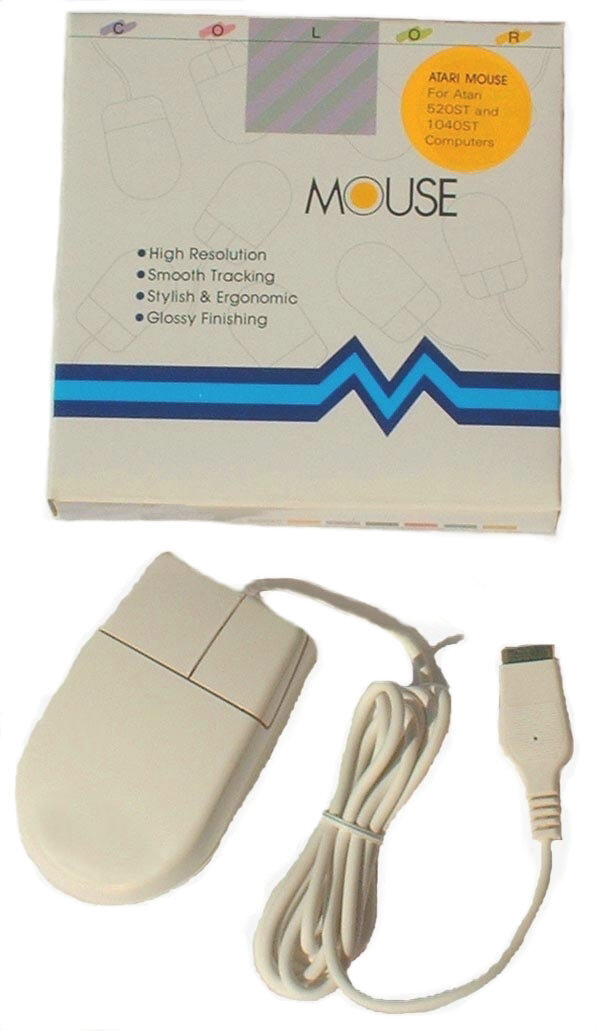
Best Electronics TrueMouse, Replacement Mouse for the Atari STM1 Stock Mouse. The TrueMouse has been our bench mark Replacement ST mouse for over 15+ years now. Thousands of World Wide Atari Falcon owners have found, once you switch over to a Best ST TrueMouse, you will never go back to the Stock Atari STM1 mouse ever again. Same over all physical size as the stock Atari STM1 mouse except a slightly lower and more comfortable profile with a back end of the mouse which is round in shape Not square with sharp corners!, Extra Wide Left and Wide Right mouse switch covers similar to the stock Atari mouse so it will fit all size hands and also has a tactical raised lip between the Left and Right switch covers, Extremely Positive Feeling Industrial Grade Micro / Mouse switches which are rated at a minimum of 1,000,000 operations per switch with only 120 grams operating force, Tracking resolution of 200 DPI, Opto-Mechanical Encoder Design, 5 1/2 Foot mouse cord, replacement TrueMouse parts available from Best and FCC Class B Approved. CB102079 $59.95
Dewey K. of WI Dewey ordered a new Best Mega 2 replacement Keyboard cable to replace the used one that was in bad shape on his just received Atari Mega 2 computer. He also ordered a new Best ST True mouse. "WOW!! I am very happy with the service I have received. You answered my questions, helped me through the ordering process, and shipped my order quickly. The keyboard cable is a great replacement for the old one. I really like the TrueMouse. It’ much better than the Atari mouse!"
Atari STM1 Rebuild Kit. Rebuild your order worn out Atari STM1 mouse and keep it as a back up ST mouse. Kit includes, a new Atari OEM STM1 Mouse cable, two new Internal Atari Mouse switches, four better than stock Best's thicker STM1 Mouse new Teflon replacement feet and new a mouse ball. Over the years Atari had about 5 to 7 different manufactures make the same STM1 mouse for them. Each version mouse looks the same from the outside but differs on the inside and bottom locking plate construction. All STM1 rebuild kits require ability to unsolder and solder in the replacement new mouse switches and one case the cable too. To configure the correct Atari STM1 Rebuild kit for your exact version old STM1 mouse. We need the following questions answered from you:
1. Where your STM1 mouse was made (one version, does not have a country listed). Usually listed on bottom label?
2. Do you have slide and snap in or Round twist and lock mouse ball locking plate?
3. Do you have Steel, Brass or Plastic internal Ball contact rollers?
4. Size of your STM1 Mouse ball, 22 mm (3/4 inch) or 25 mm (1 inch) Diameter?
5. Size of your SMT1 Mouse Internal Switches, 1/4 or 3/8 inch square?
6. Internal STM1 Mouse cable female (and the Male mating) connector Color, Tan, White, Black or in one case wires soldered directly to the STM1 mouse PCB board?
Best STM1 Rebuild Kit. CB101398 $29.95
Is my old Atari STM1 Mouse worth rebuilding?
An Atari STM1 Tech tip from Bests 42+ Atari Super Tech. Basically Atari STM1 mouse fails two different ways. 1st mechanically, bad mouse switches, bad mouse cable, bad / now very smooth (from years of use) mouse ball, damaged / corroded X / Y metal Roller shafts or damaged / missing X / Y black plastic roller end shaft locking tabs or damaged / missing X / Y shaft black plastic support U shaped black plastic shaft supports. Which can be usually fixed / cured with the above Best STM1 mouse different rebuild kits
2nd failure mode is Bad STM1 Mouse electronics. Bad LM339 dip or SMT PCB chip. Bad Infra Red Transmitter / Receiver
photo diodes. Best has found that is almost impossible to tell if your STM1 mouse photo diodes are bad or going bad. You
can Diode check (VOM meter) a known bad / acting squarely X or Y photo diode set. In most cases they will diode check
out fine. But under actual STM1 mouse use, the ST Gem cursor will drift in one direction only and stop (the other X or Y cursor movement is fine) or will act very squirrelly / move just little (photo diodes are barely working / starting to fail) and then just shakes or moves in big jumps / across / your ST monitor screen.
You can tell if your Atari STM1 mouse is worth trying to rebuild with this simple Best STM1 Tech tip. Remove the STM1 mouse locking plate and mouse ball. Then with your finger tip reach inside the Atari STM1 mouse ball cavity and move each X / Y roller shaft one at a time. If the ST screen cursor, move smoothly in the X and Y directions then your STM1 mouse is worth rebuilding. Also if your Atari STM1 Mouse is completely dead, No left or right mouse button functions, No X / Y cursor movement, this usually means multiple hair thin wires (including power and ground wires to the STM1) have broken in the STM1 mouse cable wire as it goes in the molded cable strain relief. Sometimes you can flex the mouse cable and hold it in a different direction as it goes into the STM1 mouse strain relief and get some of the STM1 functions to temporally work.
Also in stock for the Atari STM1 mouse, Bottom Mouse Ball Locking plates, Internal sets of Photo Optics (matched set of 8) and SMT or Dip version LM339 I.C.
Best's STM1 Mouse new Teflon replacement feet with adhesive backing. These Best designed and produced upgraded Atari STM1 replacement mouse feet (very light off white to light blue color), have a Teflon pad thickness about twice as thick, compared to the Stock made Atari STM1 OEM mouse feet. In theory should last twice as long as the Original STM1 mouse feet. CB101114 $5.00 per set of 4 feet
Falcon Second Hard Disk (3 1/2 IDE) Adapter board! This Small Adapter board from Wizztronics, will allow you to Connect/Use up to two external 3 1/2 IDE Hard Drives, Yes Two more IDE external Hard Drives on your Stock Falcon Computer! You can install, one 2 1/2 inch IDE Internal Hard Drive (like the Stock 80 Falcon Hard Drive), a Second External 3 1/2 IDE Hard Drive or third External 3 1/2 Hard Drive! This Wizztronics Small IDE Hard Drive adapter board, plugs into the Existing 44 pin IDE male connector under the stock Falcon internal Hard Drive Bracket! After the IDE adapter card is installed, you can reinstall your stock Falcon 80 meg internal hard drive using the Stock 44 pin Ribbon cable! A 40 Pin IDE female ribbon cable with a first and second IDE female connectors is required (not supplied) for the External 3 1/2 IDE Hard Drive(s) (Master / Slave). The user supplied 40 pin IDE cable and the supplied IDE Power cable (on the Wizztronics Falcon IDE card) are then passed thru theT/B Falcon case set behind the Falcon). CB103078 $69.95

Falcon Clear Keyboard Protector / Overlay for your Falcon keyboard. This clear, flexible skin covers the keys of your keyboard but lets you See and Type through it. Used to protect your Falcon keyboard from dust, liquids, metals and other small items that could fall into your keyboard and damage it. (See MegaSTe Keyboard Picture)CB101419 $19.95
"TT" Touch "The Best" upgrade for the Falcon and 520ST, 520STFM, 1040ST, 1040STE Keyboards by Best Electronics Improved High Grade Replacement Internal Silicone contacts firms up and give you a Tactile bounce back on each Falcon Key cap. Upgrades your mushy Falcon Keyboard to the Atari TT / High grade P.C. type keyboard standards, an amazing difference compared to the stock Falcon Keyboard. A must for every Touch Typist! Set of 95 contacts, for all world wide Falcon version Keyboards, only #0 Phillips screw driver required for installation! CB101980 Sold Out

2nd Generation "TT" Touch "The Best" upgrade for the 520STFM / 1040STF / 1040STE / Falcon 030 Keyboards By Best Electronics. Improved High Grade Replacement Internal Silicone contacts now have the current State of the Art Keyboard technology half stroke keycap travel / movement and good tactical feed back when the ST key cap is released. Upgrades your Mushy / Spongy 520STFM / 1040STF / 1040STE / Falcon stock keyboard key cap functions to the Atari TT / High grade P.C. / Laptop type keyboard standards. A night and day difference between ST / STE / Falcon Keyboards. Also the newer larger diameter textured conductive dome contact dot, will allow some non working ST cap functions to start to work again. Best will include an extra 1st Gen. TT touch day glow orange dome contact, so you will have option for a half height or full travel space bar function. Set of 95 contacts for all world wide Atari 520STFM / 1040STF / 1040STE / Falcon version Keyboards, only a #0 Phillips screw driver required for installation! CB101980-2nd $36.95
Read the 5+ month story behind the 2nd Generation "TT" Touch Keyboard upgrade internal contacts and how they almost did not happen.
Karoly B. of Germany. "A while back, I ordered 3 TT Touch sets from you. They arrived fine and all work great in my ST, STE, and a Falcon. As a satisfied customer, now I'm back, ordering more Atari things from your shop." This Atari order Karoly ordered 1, 2nd Gen. Best TT Touch ST / STE / Falcon keyboard internal upgraded contacts and 2, 2nd Gen. Best XE Touch XE / XEGS internal keyboard upgrade contacts. It is extremely rare to get any Atari feed back comments from any of our German Atari users. In the last 40+ years in the Atari business, this may be our 9th or 10th feed back comment from Germany !
Erhard P. of Germany It is extremely rare to get an Atari German user feed back comment an any of Best Atari products. Over the last 39+ years in the Atari Business, we have had a total of 8 German Atari comments back. Erhard ordered a set of Best ST / Falcon Keyboard TT Touch internal Silicon upgrade contacts. "I immediately opened one of my ugly-touch-keyboards and replaced the greenish silicone things with the new ones from BEST and reassembled the keyboard. I must say that I got more than I had expected: pushing the keyboard keys now requires a bit more pressure, but I am extremely happy with that pushing-point-feedback" (Tactical bounce / feed back when the ST key cap is pushed down and released). "In addition the computer now recognizes every key press which was not the case before" Old worn out / bad ST / Falcon keyboard Silicon dome contact conductive internal dot contacts.
Asan T. of the UK Asan must of read a review on the Best exclusive TT Touch internal ST - Falcon keyboard upgrade Silicon cups. He ordered 3 set of them. "Just to let you know that these have arrived safely here and I've just fitted them. Oh my goodness, these are absolutely amazing! They completely transform the feel of the keyboard and my only regret is that I didn't experience the benefit of these 30 years ago! Thank you so much and best wishes"
Anders G. of Sweden Anders ordered some new Atari TT Custom replacement chips and the Best Exclusive TT Touch internal keyboard Silicon replacement upgrade / enhancement contacts for Atari ST / STE / Falcon computers. "I just wanted to write and thank you for the TT-Touch keyboard upgrade! It made a huge improvement over the stock 520STM keyboard and I’m very happy with it."
Garry T. of OH Garry ordered one of Bests "TT Touch" Internal upgrade Silicon contacts for the Atari 520ST / 1040STF / 1040STE / Falcon keyboards. "The Best TT Touch keyboard silicon replacements work great. Much nicer feel when typing on my 1040 ST. Super easy to install."
Follow up Comment: "After years of mushy typing on my 1040ST, I discovered the Best TT Touch keyboard silicon replacements. I was a bit nervous about opening up my ST as I am not technical, but the instructions were super clear and the whole replacement process only took about 10-15 minutes and only required a screwdriver. Now I have a super responsive keyboard, it's like having a new ST again! Thanks Best!"
Stuart D. of Australia Stuart ordered Bests, TT Touch keyboard upgrade contacts, Falcon Translucent Dust cover and Best Rev. 10 all Atari Catalog. "I have received the order. TT upgrade is fantastic, thanks! The catalog is also a great read."
Follow up Comment: "I have to say that over the years I thought I'd forgotten how to touch type. With the TT Upgrade, no spell check, no autocorrect (and a little bit of practice) I'll be back to 75WPM quite quickly! Much better than any keyboard I can buy today!"
Richard K. of the UK Richard has placed 2 back to back International Atari orders with Best. He is ready to place his 3rd Atari order. "I fitted your Best TT touch Falcon Keyboard Upgrade contacts to my Atari Falcon - what a fantastic transformation!! In fact so good I'd like to purchase two more kits for my Atari ST's."
Matt M. of WA On placing his 3rd in a row Atari order for the month of May with Best Electronics, Matt wanted to order the Mega Touch ST Keyboard Key Cap springs that stiffen up the mushy ST keyboard key caps. Best recommended that he would be much better off getting the Best TT Touch 1040STE Keyboard internal Silicon upgrade cups. "Installed those rubber cups on my STE’s keyboard this morning — BIG improvement! Thanks!"
Brian R. of KS "Got the TT-touch installed yesterday and they work wonderfully!!"
Jason F. of UT Jason purchased Best Electronics TT Touch internal silicon cups that upgrade Atari 520ST, 520STFM, 1040ST, 1040STE and Falcon Atari Computer Keyboards. The easy to install TT Touch product will remove the ST / Falcon Mushy Key caps and end up with a high grade tactical feedback PC feeling Atari ST keyboard "I have to say the TT Touch I installed into my Falcon is premium work, I can tolerate typing on it now! Certainly, definitely a worthy product to back"
Internal Falcon IDE 2 1/2 inch Hard Drive mech. complete installation Kit. Kit includes bracket, screws, 44 Pin HD IDE cable and Atari installation Instructions CB102411 Sold Out!
Falcon Internal Hard Drive 8 inch micro pitch 44 pin IDE cable CB102147 $11.95
New Atari OEM fully molded Falcon VGA adapter with normal 90 day Atari Warranty. $24.95 with Max. US Shipping $11.70
Falcon VGA Monitor Adapter
This adapter plugs into the Falcon DB19 Video port and allows you to use a standard IBM VGA monitor on the Falcon CB102158 $24.95
Falcon ST monitor Adapter
Officially Best sold out of the Atari Falcon ST Monitor adapters about 8+ years ago. Recently we were breaking down a pallet of Atari goods we got out of the local Sunnyvale Atari warehouses over 18+ years ago. We found a small new box of Falcon ST video adapters. This Atari video adapter allows you to use the Atari ST SM124, SM144 Mono monitors and SC1224 Color monitor on your Falcon. CB102157 $29.95 Strict limit 1 total
"The Best" Series Wizztronics 4 / 16 Meg Ram Solderless Plug in Falcon Upgrade Ram Board, uses a Single 72 pin 1 Meg, 4 Meg or 16 Meg "Low Profile" SIMM module (1 Meg or 4 Meg configurations requires one cut and solder joint on the upgrade board only, boards are shipped configured for 16 Meg SIMMs) Because of it Multi layer P.C. board design the Wizztronics 16 Meg Falcon Upgrade board is the same size as the Atari original equipment plug in Falcon ram cards. Typical 10 minute installation time with NO metal cutting or part / component removal required. Compared to most other Falcon Ram Upgrade boards Sip, Dip and 1 Meg SIMM type of Ram on the market, the Wizztronics Falcon Ram Upgrade board uses a single State of the Art 72 pin Micro Channel non composite SIMM, which means less Ram chips, which also means Less connections (Ram chips to SIMM and SIMM to socket) to go bad, Less Total Ram chips also means less Current draw on your Falcon power supply! CB102163 $99.00
Falcon Atari Field Service Manual For All Models of Atari Falcons made world wide! 148 pages with 14 pages of Falcon Schematics. Sections covered: Introduction- Overview-System Features-Case Design-Power Supply Specifications, Theory of Operation-Main System- 68030 Microprocessor- 68882 Coprocessor-ROM-System Ram-COMBO I.C.-DMA Support-Real Time Clock-System Timing and Bus Control-Configuration Switch, Audio/Video Subsystem Overview-Audio Subsystem, I/O Subsystems-SCSI II Interface-Floppy Disk-68901 MFP-8530 Serial Communications Controller-Parallel Printer Port-Keyboard Interface-Mouse and Joystick Interface- Game Controller Ports-ROM Cartridge- MIDI Interface-DSP Interface-IDE Interface- Expansion Connector - System Startup-System Errors-Overall Block Diagram, Testing- Overview-Test Equipment-Test Configuration-Trouble Shooting a Dead Unit-Falcon 030 Diagnostic Cartridge-Power Up Sequence- Initialization and Check Sequence-Error Message Summary-Test Menu-Diagnostic Tests Menu-Main Menu Test Selection- Operator Tests-Error Codes Quick Reference, Disassembly / Assembly, Symptom Checklist- Display Problems-Disk Drive Problems -Keyboard Problems-MIDI Problems-RS232 Problems-Printer Port Problems-Hard Disk Problems - DMA Sound Problems, Diagnostic Flowcharts, Parts List (NTSC, PAL-I, PAL-B, PERITEL versions) and Assembly Drawings, Glossary and Schematic and PCB Layout. CB102145 $50.00

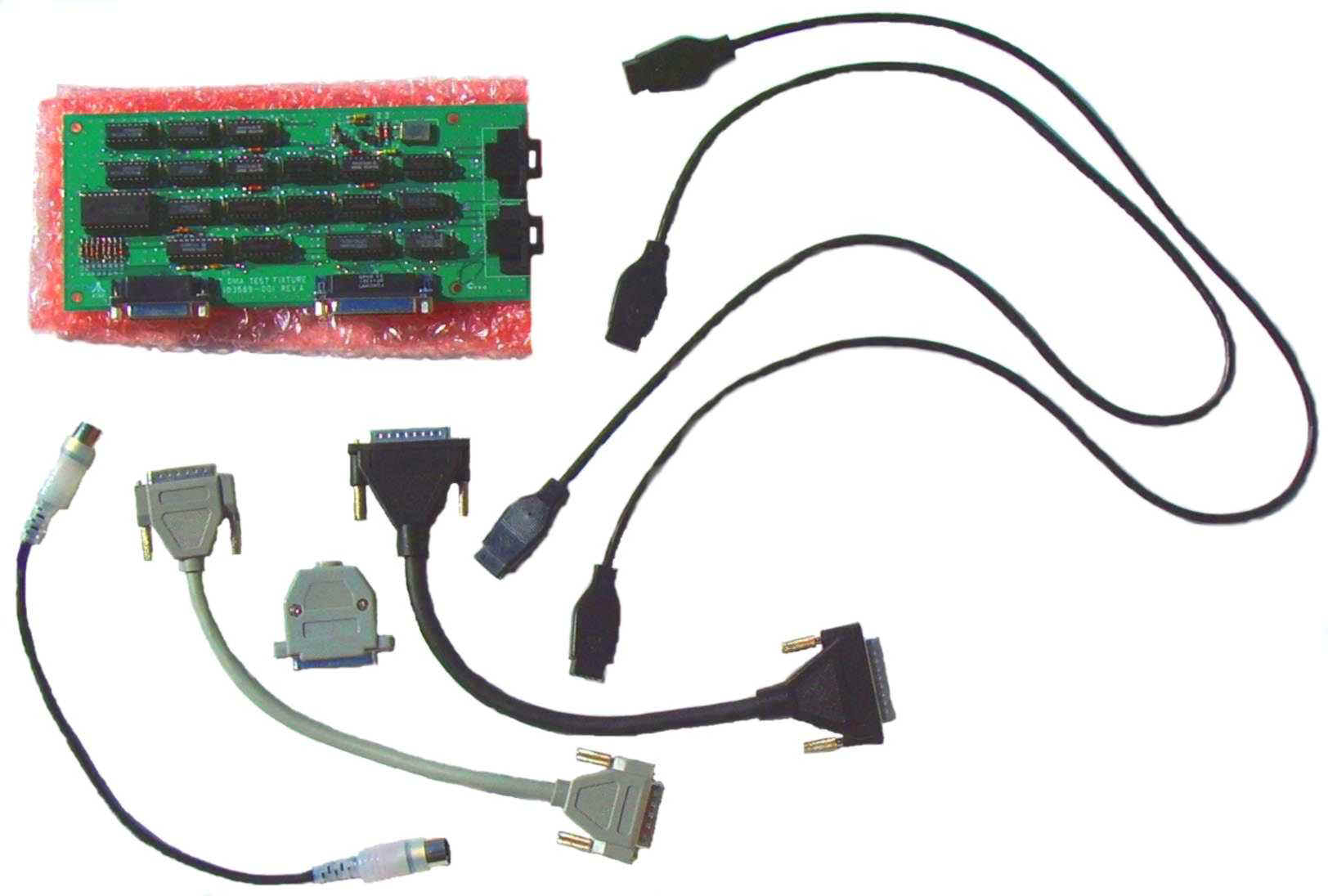
Atari 520ST, 1040ST, Mega 1/2/4, Stacy, 1040STE, MegaSTE, TT and Falcon Computer Diagnostic Loop Test Hardware Test Kit
When Atari set up a new US Atari ST Service Center Dealer, as part of the ST Dealer Service Center package (full set of ST Computer repair Manuals, ST Color and Monochrome Monitor manuals, 520ST/1040ST Diagnostic Cartridge), a new complete 520ST, (later) 520STFM and 1040ST Computers for parts) and this loop back ST Test kit. The new Atari ST Dealer paid for ($,$$$+) for this complete Atari Service Center Hardware Package.
This Atari ST Loop back test hardware is used with the many different Atari ST different Diagnostic Cartridges (520ST/1040ST/Mega, Stacy, 1040STE, MegaSTE, TT or Falcon Diagnostic Cartridges) to fully test all ST computer Internal and External hardware functions. Extra port shorting hardware / plugs required for the 1040STE, MegaSTE, TT and Falcon computers to full run all of the extra Diagnostic Tests / Ports (extra features or different style ports of those model Atari computers).
The two DB-9 black Joystick cables are connected up to the ST Joystick/Mouse ports and back to the Loopback green PCB (most ST computers require you to crisis cross (not one to one) these DB-9 shorting cables back to the loop back PCB to get the proper port diagnostic results). The short black or gray DB-25 Parallel cable is connected to the ST printer port and loop backboard. The short gray ST DB-19 DMA cable is connected to the ST DMA port and the loop backboard. The 5 pin Din shorting cable is connected up to both ST Midi Ports (one end of this Midi cable has a Red LED molded into the translucent connector housing to see the Diagnostic Midi Send and Receive sent signals). The DB-25 Serial port shorting connector is connected to the ST Modem / RS232 external Port.
Depending on the exact version Atari ST Diagnostic Cartridge used with the ST loop back hardware test board, you can choose from the ST Diagnostic display menu to run between different ST Diagnostic tests one at a time or our 27+ year Atari Super Tech’s standard 12 to 24+ hour continues Burn in loop that he tests all ST computers with. Typical Atari ST Diagnostic tests you can run using the different Atari ST Diagnostic Cartridges and Loop back external Hardware, upon boot up displays ST TOS Rev., Total ST / TT Fast Ram, Keyboard I.C. Rev. level., 5 ST Ram Tests, 7 ST internal Chip set timing Tests, if present 14 Blitter chip tests, if present 2 Real Time Clock tests, Audio tests, OS ROM Test, 2 Printer Port I/O Tests, Color and Monochrome ST display tests, 3 Keyboard tests, 5 Mouse and Joystick port tests, 12 RS232 / Serial / Modem I/O port tests, 50 / 60 Hz display toggle, 17 Internal or External Floppy Disk Drives tests, 4 DMA I/O port Tests, 2 Parallel port I/O tests, 5 Midi Send and Receive Tests. The best way to fully test and burn in any unknown condition or repaired Atari ST computer.
Atari ST Loopback board, cables and shorting connector Kit. CB102271 $59.00
Atari Tech Tip on the Loopback ST PCB board. Our Atari Super Tech strongly recommends you tape the anti Static pink bubble bag the Loopback board comes in (or tape a piece of thick and oversized piece of cardboard) to the exposed back side / solder side of the Loopback PCB board, to prevent it from shorting out / damaging the different I.C.’s on the top side of Loop back PCB should the back side of the exposed PCB come in contact with any metal.
Atari Falcon Special version External Loop back board With Analog HD-15 Joystick Test ports. Loop back board, less all connecting cables CB102678 $145.00
Falcon rev. 1.27 Diagnostic Cartridge For all World wide versions of Falcons. Upon boot up on a working Falcon this Diagnostic Cartridge Checks and Displays the following information: Total RAM, Keyboard I.C. Rev., TOS Version, if FPU is installed, Initializes the PSG, Resets the IDE, Tests the GLUE-MFP-Timer-Video Circuits. 1st Diagnostic Screen Choices/Tests: Preburn in Tests (a quick one time test of each of the tests contained in the second level Diagnostic Screen), Audio-3 Channels (Internal Speaker) and Keyboard Key Functions including the Mouse port and Left/Right Mouse switches and Error Report. 2nd Diagnostic Screen Choices/Tests: DRAM, SCC Serial (Requires LAN and Modem shorts Plugs below), Floppy-Quick Tests-Read Alignment Disk-Disk Change Detect-Disk Exerciser, Check Copy Protect Tracks (80-82)-Test Speed-Install Disk Drives (Single-Double-High Density), Short Blit, Analog Audio for Right and Left Channels at Noise Floor-200Hz-1KHz-5KHz-15KHz Levels with Continuous graph displays for each Channel and a Summary of all Audio Tests OS. CB 102678) and Connecting Cables), Midi (Requires Loop Back Midi cable (CB 102600), Digital Audio-DSP and DSP2 (Requires DSP Short plug) - DSP SRAM - Crackle Test, Real Time Clock, Expansion Buss, Audio and Video-Color Test-VGA Modes Test-Video Monitor Test-Help Sub Menu, Keyboard, IDE Hard Disk-Hard Disk Exerciser-Hard Disk Controller Diagnostic Test, Examine/Modify System-Set RS232 Rate-System Controls (Address Buss Errors Enabled-Blitter Clock: CPU Clock-CPU 16Hhz-Blitter Disabled-Bus Error Timeout), Examine Modify Memory, ?Help. From this second level Diagnostic Menu you can Run All unattended Tests or Run unattended Internal Tests only in Single Pass or Continuous Burn In Loop Tests. CB102146 $80.00
| Falcon LAN PORT Shorting Plug above Falcon Diagnostic Cartridge LAN Test. | CB102679 | $30.00 |
| Falcon SERIAL PORT Shorting Plug Required for above Falcon Diagnostic Cartridge. | CB102801 | $16.00 ea. |
| Falcon DSP Shorting Plug Required for above Falcon Diagnostic Cartridge DSP Test. | CB102844 | $54.95 |
| Falcon MIDI 12 to 13 1/2 inch loopback cable For above Falcon Diagnostic Cartridge Midi Test. | CB102600 | $4.00 |
| Falcon ANALOG AUDIO Loop Back Cable For Falcon Headphone and Microphone Jacks. Required for the Analog and Audio tests for above Falcon Diagnostic Cartridges. | CB102845 | $20.00 |
| Falcon R/A reset switch with gray cap | CB101490 | $6.95 |
Best Electronics in the Atari business since February 1, 1984.
Current Pacific Standard Time is:
E-Mail: